



You just wrapped a 2,000-person festival. Ticket revenue: $180,000. Now comes the part nobody warns you about.
Your venue gets 10% of gross ticket sales. Your marketing affiliate gets 7% of the tickets they drove. Your talent agent is owed a flat guarantee plus 5% of anything above a threshold. Your production partner gets a fixed cut per ticket for the VIP experience they built.
That's four different payment structures across four different partners — and you're calculating each one in a spreadsheet, cross-referencing Stripe transactions, and sending individual wire transfers or Zelle payments while hoping you don't miscalculate and erode a relationship you spent months building.
This is the reality of event revenue splitting. And for most promoters, it's the most time-consuming, error-prone part of the business that nobody talks about.
Why Event Revenue Splitting Is So Painful
Selling tickets is the visible part of event promotion. Revenue distribution is the invisible part — and it's where operational overhead quietly eats into your margins and your time.
Here's what makes it painful:
Every Event Has a Different Deal Structure
Your Saturday night club show might be a straight 90/10 split with the venue. Your festival has five partners with different percentages. Your mid-week comedy night has no partners at all.
Most ticketing platforms handle payments at the processor level — one global configuration. That means you can't run different split structures for different events without workarounds, manual calculations, or separate Stripe accounts.
Multi-Event Checkouts Break Simple Math
When a buyer purchases tickets to three different events in a single cart — and each event has a different revenue split — the math gets complicated fast. Which line items belong to which event? Which partner gets paid from which portion?
If your platform doesn't handle attribution at the event-line-item level, you're left doing it manually. And "manually" means spreadsheets, formula errors, and reconciliation headaches.
Chargebacks Create Reversal Chaos
A buyer disputes a charge. Stripe pulls the money back. But you already paid your venue partner their 10%. Now you need to claw that back, recalculate, and communicate the reversal — all while managing the dispute itself.
Without automated reversal logic, every chargeback turns into a multi-party accounting problem.
Partners Lose Trust When Payments Are Opaque
Your venue partner asks: "How much did we earn from last weekend's show?" If your answer requires 20 minutes of spreadsheet work, you're signaling that you don't have your financial operations under control. That erodes trust — and trust is the foundation of every partnership that survives past one event.
The promoters who manage events as economic ecosystems understand this instinctively: every event involves multiple parties with financial stakes, and the system for managing those stakes needs to be as professional as the event itself.
The Five Partner Types That Require Revenue Splitting
Not every event has all five, but most promoters work with at least two or three at any given time.
1. Marketing Affiliates
Affiliates drive ticket sales through tracked links, social promotion, or direct outreach. Their commission is typically a percentage of each ticket they sell — anywhere from 5% to 15%.
If you're running a proper event affiliate program, you might have 10-30 affiliates per event. Calculating and distributing individual commissions manually doesn't scale past your second event. Automated percentage-based splits tied to affiliate-attributed sales eliminate this entirely.
2. Venue Partners
Many venues take a percentage of ticket revenue as part of the rental agreement — especially in markets where venue economics are tight. This is common across Latin America, the Caribbean, and increasingly in US markets for mid-size venues.
The split might be 5-15% of gross ticket revenue depending on the deal. It needs to calculate automatically on every ticket sale, not as a lump-sum post-event settlement.
3. Talent Agents and Managers
Performer agreements often include revenue-sharing components — a guaranteed minimum plus a percentage above a threshold, or a straight percentage of net ticket sales.
When your ticketing platform handles the split at the event level, you can configure the agent's percentage once and let every ticket sale auto-calculate their share. The agent gets visibility into their earnings in real time instead of waiting for your post-event reconciliation email.
4. Production and Experience Partners
For events with premium experiences — VIP sections, backstage access, curated food and beverage — production partners who build those experiences often take a revenue cut from the tickets that include their offering.
This requires ticket-type-level attribution: the VIP ticket includes the production partner's split, but the GA ticket doesn't. If your platform only supports one split per event (not per ticket type), you're back to spreadsheets.
5. Co-Promoters and Joint Ventures
Some events are co-promoted — two promoters sharing risk, resources, and revenue. The split might be 50/50 or weighted based on who brought what to the table.
Co-promotion splits need to be clean from day one. If both promoters can see real-time revenue flowing into their respective accounts, alignment stays tight. If they can't, disputes are inevitable.
What the Right Revenue Splitting System Looks Like
The fix isn't "a payments feature." It's an event-level financial infrastructure that handles the full lifecycle: configuration, calculation, hold periods, automatic execution, reversal logic, and transparent reporting.
Event-Level Configuration (Not Processor-Level)
Each event should have its own distribution rule — completely independent of other events. Your Saturday festival shouldn't share payment logic with your Wednesday comedy night.
TicketBlox configures revenue splits at the event level. When you create or edit an event, you set the partner's percentage and connect their Stripe account. Different events, different partners, different percentages — all coexisting on the same platform without conflict.
Automatic Calculation on Every Sale
When a ticket sells, the system should instantly calculate:
- The partner's share based on the configured percentage
- Your net earnings after the partner's share
- A payout record linked to that specific event
No manual step. No end-of-month reconciliation. Every transaction is calculated in real time.
Multi-Event Checkout Attribution
When a buyer purchases tickets to three events in one cart, each line item should route to its own event's distribution rule. Event A's partner gets their percentage of Event A's tickets. Event B's partner gets theirs. Event C has no partner split.
TicketBlox handles this natively. Multi-event checkouts are attributed at the line-item level — the same precision that makes all-in transparent pricing work for buyers also makes revenue attribution work for partners.
Chargeback-Protected Hold Periods
To protect both promoters and partners from chargeback risk, payouts should queue for a hold period (typically 24 hours) before executing. If a chargeback or refund occurs during the hold window, the partner payout adjusts automatically — no manual reversal required.
After the hold period, transfers execute without intervention. Partners get paid on schedule. You don't have to babysit the queue.
Additive vs. Split Mode
Two models for structuring the partner's take:
| Mode | How It Works | Best For |
|---|---|---|
| Additive | Partner's percentage is added on top of your standard fee. Your fee stays the same. | Marketing affiliates, venue partners — when the partner cost is a business expense, not a margin reduction. |
| Split | Partner's percentage comes out of your standard fee. You share your margin. | Co-promoters, joint ventures — when both parties are sharing the revenue pool. |
Most platforms force one model. TicketBlox lets you choose per event.
Real-Time Earnings Visibility
Both you and your partners should be able to see, at any moment:
- Gross application fees collected — total revenue before splits
- Partner/affiliate transfers — what's been distributed (pending, queued, transferred, or reversed)
- Net earnings — what you keep after all distributions
This transparency eliminates the "how much did we make?" conversation. The numbers are always visible, always current, and always attributed to the correct event.
Real-World Example: Three Events, Three Structures, Zero Spreadsheets
You're running three events this month:
Event 1 — Reggaeton Festival: 7% to your marketing affiliate network that drives ticket sales through tracked links. 10% to the venue. Additive mode — both percentages are on top of your base fee.
Event 2 — Comedy Night: 5% to the venue partner. No affiliates. Additive mode.
Event 3 — Workshop Series: No partner payments. Your standard fee only.
You configure each event's distribution rule in under 2 minutes. Done.
A buyer purchases tickets to all three events in a single checkout. TicketBlox attributes each line item to the correct event, applies the correct distribution rule, calculates each partner's share, and queues the payouts.
24 hours later, the transfers execute automatically:
- Your marketing affiliate gets their 7% of Event 1 sales
- The venue gets their 10% of Event 1 and 5% of Event 2
- Event 3 generates no partner payouts
Your Event Earnings report shows the full breakdown per event — gross fees, partner transfers, net earnings. No spreadsheet. No manual calculation. No "let me check and get back to you."
Now multiply this across 10 events per month with 3-4 partner types each. The time savings alone justify the system — but the real value is in the accuracy, the trust it builds with partners, and the operational leverage it creates.
How This Connects to Your Broader Event Operations
Revenue splitting doesn't exist in isolation. It's one layer of the financial and operational stack that runs your event business.
When your revenue splitting is automated:
- Affiliate programs scale. You can onboard 30 affiliates without worrying about 30 individual commission calculations. The affiliate system and the payments system work together.
- Box Office revenue distributes correctly. Walk-in sales and VIP upgrades on event day follow the same distribution rules as pre-sales. No separate reconciliation for door revenue.
- Post-event reporting is instant. When your partners ask "how much did we make?", the answer is already in the dashboard — alongside the audience data and check-in analytics that tell the full story of the event.
- Platform evaluation gets clearer. When you're comparing ticketing platforms, ask whether they handle revenue splitting at the event level or force you to manage it externally. Most don't. That's a hidden operational cost that shows up as hours of spreadsheet work every month.
Getting Started in 4 Steps
Step 1: Connect Your Partner's Stripe Account
TicketBlox uses Stripe Connect to securely link your partner's payment account. This takes under 5 minutes and is a one-time setup per partner.
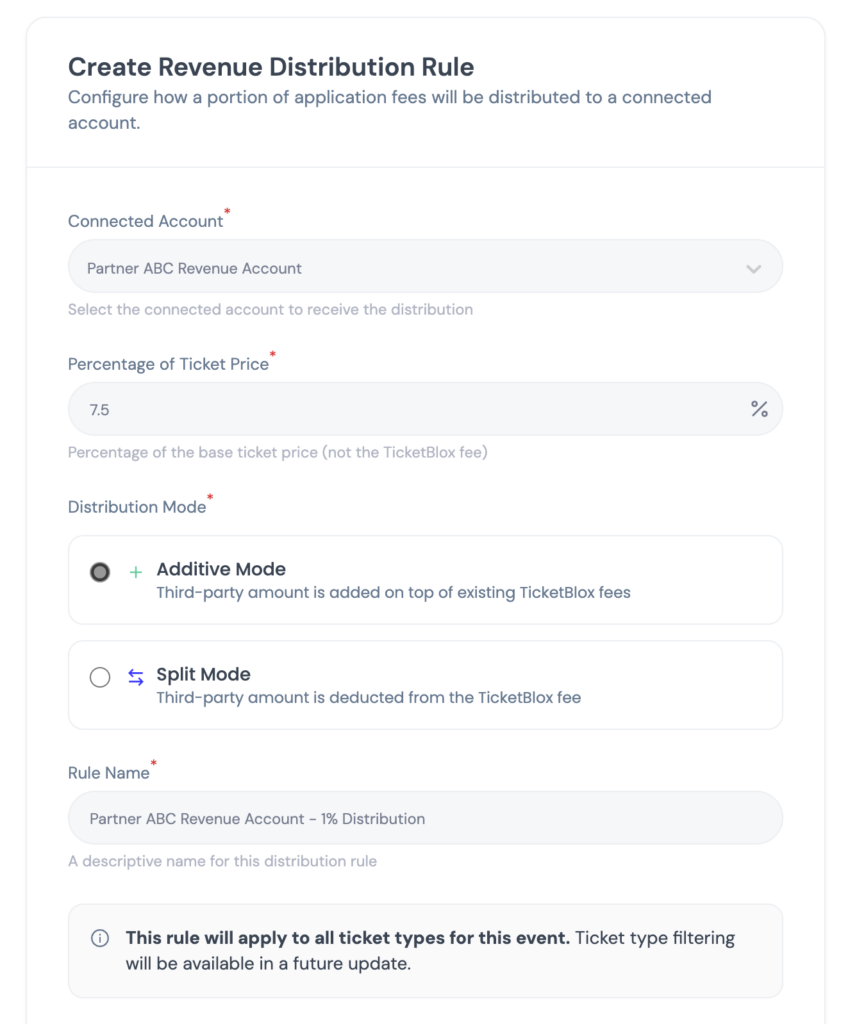
Step 2: Configure the Distribution Rule
When creating or editing an event, set the partner's percentage (e.g., 7%) and select Additive or Split mode.
Step 3: Publish and Sell
That's it. Every ticket sale automatically calculates the partner's share, queues the payout, and executes the transfer after the hold period.
Step 4: Review Your Earnings Report
Your Event Earnings report shows gross fees, partner transfers, and net earnings — per event, updated in real time.
No spreadsheets. No wire transfers. No reconciliation emails. The system runs itself.
Book a Demo → and see how TicketBlox automates revenue splitting so you can focus on producing events, not chasing payments.
Frequently Asked Questions
How does event revenue splitting work with automated payouts?
When a ticket sells, the platform calculates each partner's share based on the percentage you configured for that event. Payouts queue for a 24-hour hold period (to protect against chargebacks), then transfer automatically to the partner's connected Stripe account. Every transaction is tracked in your earnings report with full audit trail visibility.
What's the difference between additive and split mode for partner payments?
In additive mode, the partner's percentage is added on top of your standard fee — your take stays the same, and the partner's cut is an additional cost. In split mode, the partner's percentage comes out of your fee — you share your margin. Additive works for affiliate and venue partnerships; split works for co-promotions and joint ventures.
Can I set different revenue splits for different events?
Yes. TicketBlox configures distribution rules at the event level, not the processor level. Each event can have its own partner, its own percentage, and its own additive/split mode — all running on the same Stripe account. Events without partner splits run normally alongside events with complex multi-party distributions.
How are chargebacks handled when partner payments have already been distributed?
If a chargeback or refund occurs during the 24-hour hold period, the partner payout adjusts automatically before transfer. If it occurs after transfer, the system creates a proportional reversal record and adjusts future payouts accordingly. Every reversal is logged in the financial ledger with complete visibility for both you and your partner.
What happens with multi-event checkouts where each event has a different split?
Each line item in the cart is attributed to its specific event, and each event's distribution rule applies independently. If a buyer purchases tickets to three events — one with a 7% affiliate split, one with a 5% venue split, and one with no split — each portion routes correctly. Partners only receive payouts from the events they're configured on.
How many partners can I set up per event?
TicketBlox supports configuring distribution rules per event. For events with multiple partners (e.g., an affiliate and a venue), you can layer rules to accommodate different partner types. The system calculates each share independently and tracks payouts separately in your earnings report.